A rough mix that already sounds right.
A raw take is darker and boxier than the same instrument in a finished mix. FixEQ takes each track towards the typical tone of its instrument, with three very wide, musical bands, and FixReso brings a resonance down only while it rings. It isn't a mixing EQ: it is the broad stroke that lets you judge the balance before you start.
In the app: the FixEQ column, the FixEQ card in PROCESS, the miniMix and Track Presets, and the FixEQ window.
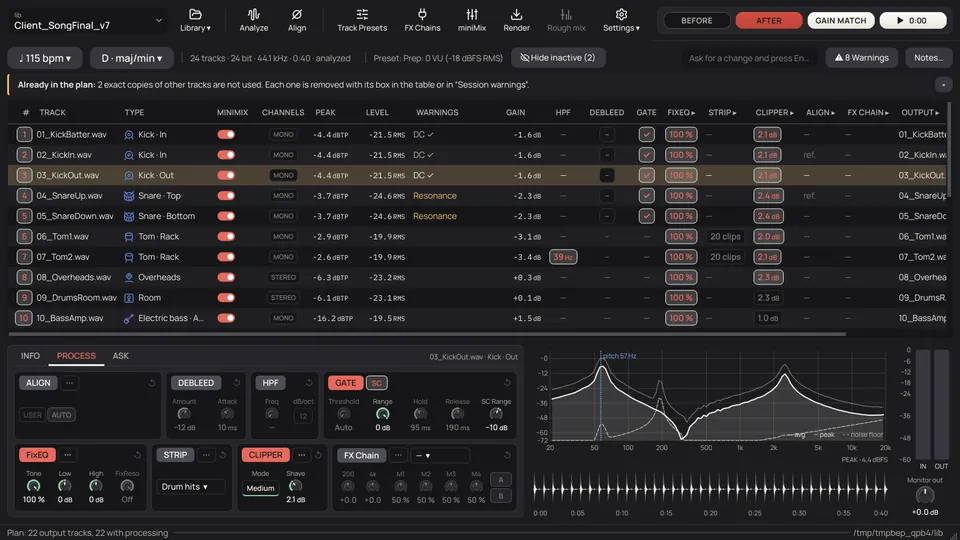
Towards its instrument, by a broad stroke.
TapeLeader knows the typical shape of the kick, the snare, the bass, the vocal and the rest, and works out what each track is missing and what it has too much of. There's nothing to choose.
- 22 instrument references, measured with pink noise and a little darker in the highs than a finished mix, because a raw take is. Toms, overheads, room and cymbals go with the whole kit's; the vocal with a low or a high voice's, by where it sings.
- Measured on its own hits on kick, snare, toms and percussion; otherwise a snare would be the hi-hat that leaks into it. Elsewhere, where it plays.
- Mics of one source as one: their sum is measured and the broad curve is the same on all of them, so the source goes towards its instrument, each mic keeps its own sound and the alignment between them doesn't change.
- Same level out: FixEQ comes out at the level it went in, so the gain, Clipper and the FX Chain get the track the way they expect.
Drawing of a snare's spectrum and the FixEQ curve. In the app, the FixEQ window shows the track's own.
Three wide bands, and a few narrow cuts that wait.
The lows in minimum phase, like an analogue EQ: no echo before the hit. From the mids up, zero phase: nothing turns. What is less than 1 dB away from the reference is left alone, and below where the track starts or below its HPF it hardly boosts at all (on cymbals and shakers, not at all).
| Band | What it is | Range | Phase |
|---|---|---|---|
| Low shelf | First order, 6 dB/oct and no bump, from the family of the Baxandall tone control | 50–300 Hz, ±9 dB | Minimum |
| Bell | A very wide bell, Q 0.3 to 0.6, two to four octaves, like those of the Maag EQ4 | 150 Hz–5 kHz, ±9 dB | Minimum under 300 Hz, zero above |
| High shelf | The same first-order shelf, in the highs | 1.5–10 kHz, ±3.5 dB | Zero |
| FixReso | A narrow, dynamic bell, Q 4 to 8, that only cuts when its frequency rings above what's usual on the track. Two per track | −4.5 to −6 dB proposed; down to −9 with the knob | Minimum |
FixReso: only where each instrument rings.
Resonances are looked for only in the zones where each instrument usually has them, the same zones where the track's warnings look. A peak that sticks out 6 dB or more from its octave gets a dynamic band that can bring it down by up to three quarters of what it sticks out, 6 dB at most, only in the moments it rings: on a snare or a tom, in the hit and its tail; between hits, nothing.
| Track | Where it looks |
|---|---|
| Kick | 150–600 Hz, boxiness; 600 Hz–1.5 kHz, resonance in the mids |
| Snare | 300 Hz–1.2 kHz, ring; 1.2–5 kHz, resonance in the crack |
| Toms | 130–300 Hz, ring; 300 Hz–1 kHz, boxiness |
| Hi-hat, ride, overheads, room | 3–7 kHz, harsh cymbals |
| Bass | 1.5–7 kHz, fret or pick noise |
| Electric guitar | 1.5–5 kHz, harshness; 5–10 kHz, amp fizz |
| Acoustic guitar | 1.5–4 kHz, hard mids; 4–8 kHz, pick or string noise |
| Vocals | 1.5–5 kHz, harshness; 5–10 kHz, resonance where the esses are |
| Keys, strings, brass, synths | None: nothing is cut, so their character stays |
Each mic, its own.
- Each mic has its own FixReso bands and listens to itself, the snare top and the snare bottom too, because an engineer treats them apart.
- The mixing guides don't agree on frequencies, a kick's box anywhere from 150 to 600 Hz. So the zones are where a measured peak is looked for, not fixed figures to cut.
Four knobs, and the window to see it.
The same card in PROCESS, in the miniMix and in Track Presets. A green dot on each knob marks what the program proposes; double-click goes back to it.
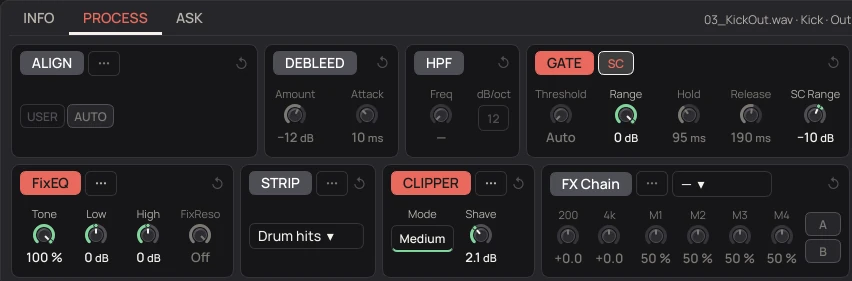
- Tone
- How much of the recommended EQ: 100 % is what was worked out, 50 % half the dB in each band, 0 % nothing.
- Low · High
- dB added to or taken from the low and high shelves the program chose, −9 to +9. 0 is the program's. Low moves on every mic of the source at once, so their alignment stays.
- FixReso
- The Range of the deepest resonance, the others in proportion. Off on the right and more cut towards the left. The mouse says which frequencies and how much.
- ···
- The FixEQ window: the spectrum BEFORE and AFTER with the recommended EQ, the FixEQ curve with each band, LOOP, BEFORE, AFTER and GAIN MATCH.
Character is for your plugins.
FixEQ gets the broad tone right. When a track has to come out of preparation with a sound, a tape, a console, a compressor that breathes, that's your own VST3s, in FX Chains per type of track, measured so they work at their sweet spot.
[MANUAL: chapter 9.11] FixEQ and its window, with every control, are in the manual.