Clean, and only where it's needed.
The other drums in each close mic, rumble under the notes, mains hum, minutes of nothing between two vocal lines. The cleaning you'd do before the first fader, measured on each track instead of set from a table. Whatever takes something away can be heard BEFORE and AFTER, and turned off with one button; only the safety steps (DC, the ultrasonic LPF, the edge fades) always go on.
In the app: the DEBLEED, HPF, GATE and STRIP cards in PROCESS, their columns in the main window, and the Strip Silence window.
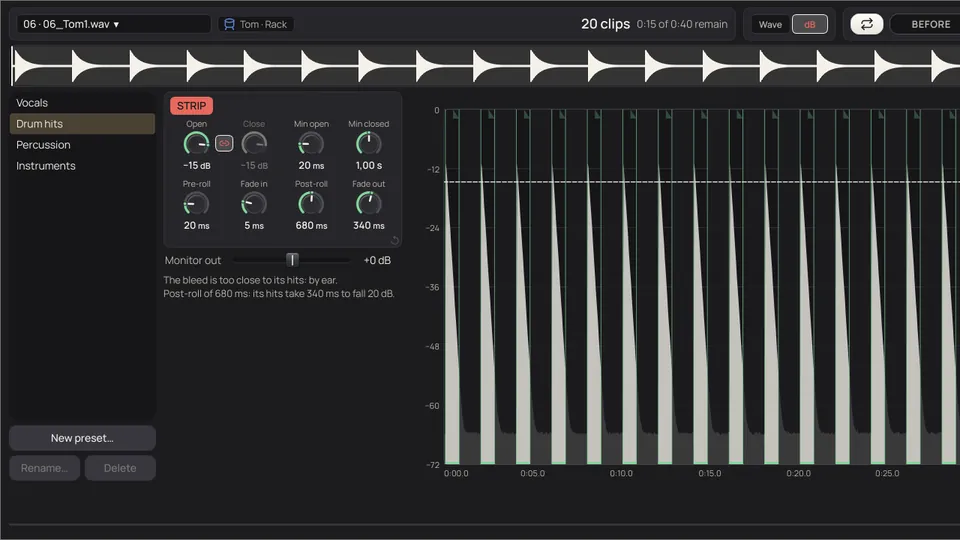
Less of what doesn't belong. All of what does.
Each job has a limit: it stops before it takes something the track needs. The measured figures come from real sessions.
- The other drums, out of each close mic
DeBleed separates by frequency, and also inside the hit: the kick and the hi-hat in the snare mic while the snare is ringing. It learns how each drum sounds in this session. No AI.
−12 dBthe Amount to try first: nothing that leaks in comes down more than that. - A gate that listens to the other drum
On a kick or a snare, the SC listens to the other one. When it plays and only its bleed is in this mic, the mic comes down; your own hits go through, and so do the soft ones that stand out over the bleed.
4–12 dBthe SC Range, set on each track from how much leaks in. With ghost notes, 8 at most. - No gate where there are ghost notes
A level gate can't tell a soft hit from bleed, and would take both. So where a mic has soft hits, no level gate is proposed, and its sheet says why.
1.4 %of the time the gate was open on a tom mic of a real session, in an early test: its hits, with the snare leaking in at −16 dB. - The HPF just under the lowest note
Not a value per type: the cut is measured on each track, just under the lowest note it really plays, so the filter takes 1 dB at most at that note (option A, the default; B cuts right at it). On a kick or a tom, under the lowest it can be heard; on a snare, under where its own hits start.
96 Hzthe snare top and bottom of a real session, whose own hits start at 125 Hz: both mics, one cut, zero phase. - Hum, subtracted
Measured and subtracted, not notched: a bass note on 100 Hz stays where it was. If the hum isn't steady enough to measure, the track is left alone.
−18 → −50 dBthe hum on an electric guitar. On a bass amp, −16 → −40. - Long silences, as clips
A vocal that comes in now and then is left in clips, with their pre-roll, post-roll and fades. In the DAW you can still stretch any edge.
1 sa silence shorter than this is never cut: the pauses between words stay.
Inside the hit, too.
The SC and the gate open or close the whole mic between hits. DeBleed separates by frequency, so it also cleans what leaks in while the drum of the mic is playing. It sounds after Align and before the HPF, the SC and the gate, and works the same with the gate on or off.
- On the close mics of kick (In, Out), snare (Top, Bottom) and each tom. It needs a snare top and a kick mic in the session.
- Only where there's bleed: a mic whose bleed is more than 30 dB under its own hits says No bleed, and can't be turned on.
- It learns how each drum sounds in the main mics of the kit, once per session: about 4 minutes for a 4-minute song with six close mics. It tells you how long before it starts, and what it learnt is kept.
- Change Align a lot afterwards and it says Other Align, so you can recalculate. It never recalculates on its own.
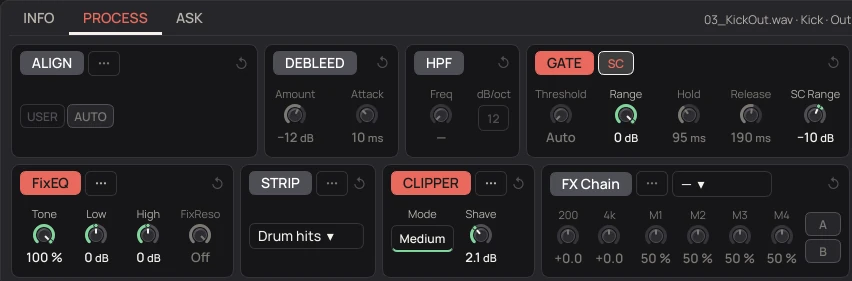
Drawing of a snare mic, 1.2 s. In the app, Amount and Attack are set on each track.
- Amount
- From Off to −30 dB: the most any frequency of what leaks in comes down.
- Attack
- 0 to 30 ms, 10 by default. In the first milliseconds of each hit the highs come back, so the attack keeps its brightness.
- Cautious mode
- With few loose hits of a drum, the track is cleaned less, or not at all, and the card says so.
The bleed measured, then the gate.
In a kit each close mic also picks up the others. TapeLeader measures how much of each drum gets into each mic, in dB against the mic's own hits: −6 dB is nearly as loud as its own, −25 dB you barely hear. With that it decides where the gate goes and with what threshold.
Find the hits.
The hits on each mic. Hits that land on several mics at once are one hit.
Whose hit is it.
Each hit belongs to the drum whose mic is closest to its peak.
Listen where the mic's drum is silent.
For one mic and another drum, the hits of that drum where the mic's own drum doesn't play: what sounds in the mic then is the bleed.
Only what's reliable.
Real bleed follows the strength of the hit, so it barely changes from one hit to the next. If it changes a lot, or there are fewer than 8 hits, it gives no figure."bleed: tom 1 at −17 dB"
| Case | What it does |
|---|---|
| Bleed you can hear, 10 dB or more under the hits | Gate ticked, with the threshold between the bleed and the hits, and the hold, release and detection filter set to the track |
| The same, with many soft hits | No gate: a level gate would take the ghost notes too. The sheet of the track says so |
| Bleed close to the hits, −10 to −6 dB | Gate proposed, unticked: listen to it |
| Hi-hat or ride, with more than −15 dB in | Gate proposed, unticked (ticked if it plays very little) |
| Bleed within 6 dB of the hits | Not proposed: a level gate can't separate them |
| Little bleed, or a track already clean | Not needed, and the plan says so |
| Kick or snare, the other one heard and measured well | Gate with SC. If what's left separates from the hits, the level gate behind it too; if not, its Range goes to 0 dB and only the SC works |
Ticked by default.
The gate fits each drum.
- The threshold sits between the bleed and the hits, a little nearer the bleed, because cutting a soft hit is worse than letting a little bleed through.
- Hold is half of what the hit takes to fall 20 dB; release, the whole of it. A tom that rings is let ring; a dry kick closes sooner.
- The detection filter centres on the measured fundamental of each drum, so the kick's gate doesn't open with the cymbals.
- On drums the default is a gentle 2:1 expander: 4 dB down at most on kick and snare, 6 on toms and percussion. With the SC, the mics of one source (in and out, top and bottom) listen to the same detector.
- By default the gate goes to the Reaper or DAWproject project as automation, so you can retouch it or take it out in the DAW. On a track whose FX Chain is printed, the gate is printed too. Cubase doesn't import DAWproject automation yet: for Cubase, print it.
Just under the lowest note it really plays.
Here the HPF only cleans: rumble, mic stand knocks, wind, bleed. It doesn't add level, and the character is for the engineer, later.
Find what really belongs to the track.
On vocals, guitars, keys, strings and brass, the lowest note it really plays: a low note that repeats, with harmonics on top, not hum or bleed. On kick and toms, the lowest they can be heard: their loudest third-octave put at a loud 85 dB SPL, and the lowest band still above the threshold of hearing (ISO 226), so the air the head pushes, which no one hears, doesn't count. On the snare, where its own hits sound at least 3 dB louder than the kick's hits in that mic: below that, it's the kick leaking in. Hi-hat and ride, never below 300 and 200 Hz. On the other drums, overheads and rooms, where the sound that's only this track's starts.a real session, option A: kick 22 Hz · snare 96 · toms 55 and 27 · overheads 29 · bass 32 (E1) · guitars 63 (E2)
Cut where it cleans: A or B.
A, the default: the cut sits where the filter takes 1 dB from that note, with 48 dB/oct zero phase at 0.77 times its frequency; 1 dB on the lowest note alone is under what can be told from a level change. B cuts right at it (−6 dB there), as you would when mixing. Each type has a ceiling, only for safety in case the measurement goes wrong: what's measured on the track rules.
Only if there's something to take.
It is proposed only when there's something under the cut. It comes ticked when the note or the floor is measured on the track, on instruments with notes, or when there's real rumble; if not, it's left for you.
One cut for one source.
All the mics of one source get the same cut, the lowest of the group, and the same filter. And if one has an HPF, they all do: with the snare top filtered and the bottom not, their sum loses body. If you take it off one mic by hand, that stays.
Zero phase, or minimum phase.
- Zero phase doesn't turn the phase of anything, so doubles, pairs and mics of one source keep summing exactly the same. The price, a slight pre-echo around the cut.
- Minimum phase, like an analogue filter: no pre-echo, but it turns the phase near the cut.
- In Auto it chooses per track: zero phase for subsonic cleaning (under 30 Hz), sustained sounds, overheads and room, and on kick, snare and toms. Those sum with the overheads, and in minimum phase the filter would change their body in that sum and undo what Align decided (measured in three sessions: on the snare up to 2 dB and about 1 ms; on a tom, even the polarity; on the kick, up to 7 dB in the lows). Minimum phase on the other hits with an audible cut (hi-hat, percussion), where the pre-echo would be heard.
- On the HPF card: the Freq knob, the slope, and USER · A · B. A and B change every mic of the source, and each button says why, with figures; moving the knob or the slope goes to USER. In Track Presets, Option sets A or B for each type.
Hum is subtracted, not filtered.
The 50 Hz of Europe and most of the world, or the 60 Hz of North America, and its harmonics: ground loops, amps, the building's wiring. Not a gate and not a notch: TapeLeader measures the hum over the whole track and subtracts it, first thing, before anything else, so what isn't hum stays intact. If it can't be measured steadily, the track is left alone.
Measure every second.
The amplitude and phase of each harmonic, in one-second stretches.
Learn it in the quiet parts.
The typical amplitude comes from the quiet parts. Where the music spoils the measurement, the phase is rebuilt from the reliable stretches around it.
Synthesise it and subtract it.
Notes that fall right on those frequencies stay. If in some stretch the subtraction would add instead of take away, that stretch isn't touched.
And on every track, always.
- DC offset above −60 dBFS: the mean is subtracted. Neither the phase nor the lows are touched.
- Ultrasonic LPF, zero phase: everything audible intact up to 20 kHz, and what's above it out, so saturating plugins don't fold it back into the audible band as distortion.
- Edge fades of 5 ms where a track doesn't start or end in silence, to avoid clicks.
Long silences out, breaths in.
The Strip Silence of Pro Tools and Logic, the Detect Silence of Cubase. A long track with long silences is left in clips with audio and the rest out. It isn't the gate: the gate brings things down a few dB between hits; this takes whole stretches out, with pre-roll, post-roll and fades.
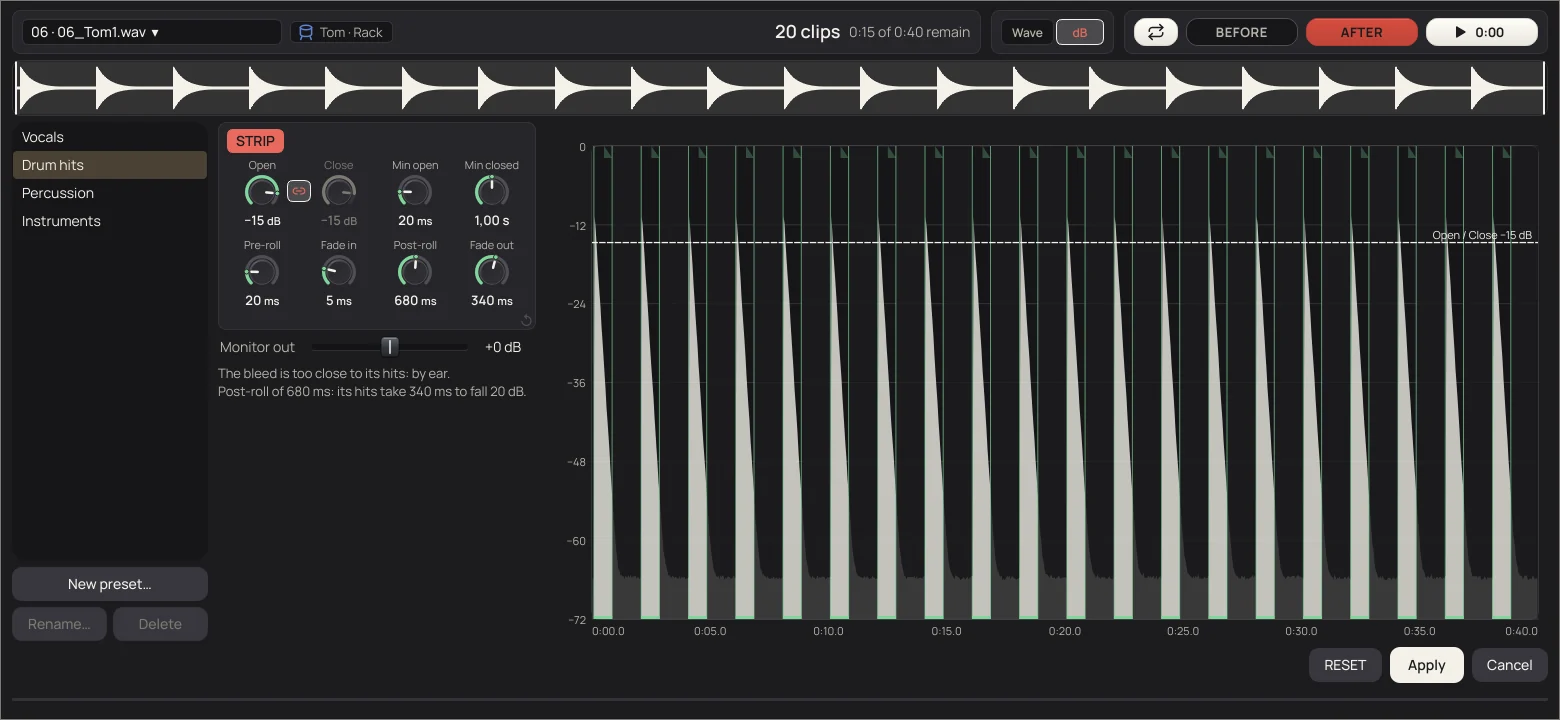
- Open · Close
- The thresholds. With LINK, the same; unlinked, Close can go lower to hold a note's tail. Set on each track, 10 dB over its own noise floor.
- Min open
- A shorter piece is dropped: a click, a knock on the stand. 100 ms; 20 on toms.
- Min closed
- A shorter silence isn't cut. 1 s, so pauses between words and phrases stay.
- Pre-roll · Post-roll
- What each clip starts before it opens and goes on after it closes. On vocals, 300 and 500 ms; on a tom, from how long its hits ring.
- Fade in · Fade out
- The fades of each clip, inside it.
- Wave · dB
- The track as a waveform, or in dB from 0 to −72, where you see breaths, bleed and tails. Drag the Open and Close lines.
Where it comes on, and how it comes out.
- On where it cuts at least 5 s and 8 % of the track: vocals, guitars, bass, keys, strings, brass, loose percussion and FX. On toms only if the bleed is well under the hits. On kick, snare, cymbals, overheads and room it stays off: there, the gate.
- Clips (default): the WAVs come out whole and each piece is a clip in Reaper and the DAWproject, so you can stretch any edge. Audio: the cut is written in the WAVs, for dragging into any DAW. Clips + audio: both.
- Four presets come with it, Vocals, Drum hits, Percussion and Instruments, and you save your own.
[MANUAL: chapters 6, 9.2–9.9] DeBleed, the gate and SC, the HPF, hum and Strip Silence, with every control, are in the manual.