It reads the folder the way an assistant would.
You get a ZIP. Inside, a Kick In and an Audio 2_01 that sounds like a kick but says nothing in its name, a comped vocal and an exact copy of it, a Track 24 that never makes a sound, and an email with the tempo and the markers. TapeLeader opens the folder or the archive as it came, goes through every file, and before you touch anything shows what it found and what it proposes. When it isn't sure, it says so.
In the app: the session list, the main window, Warnings and Notes…
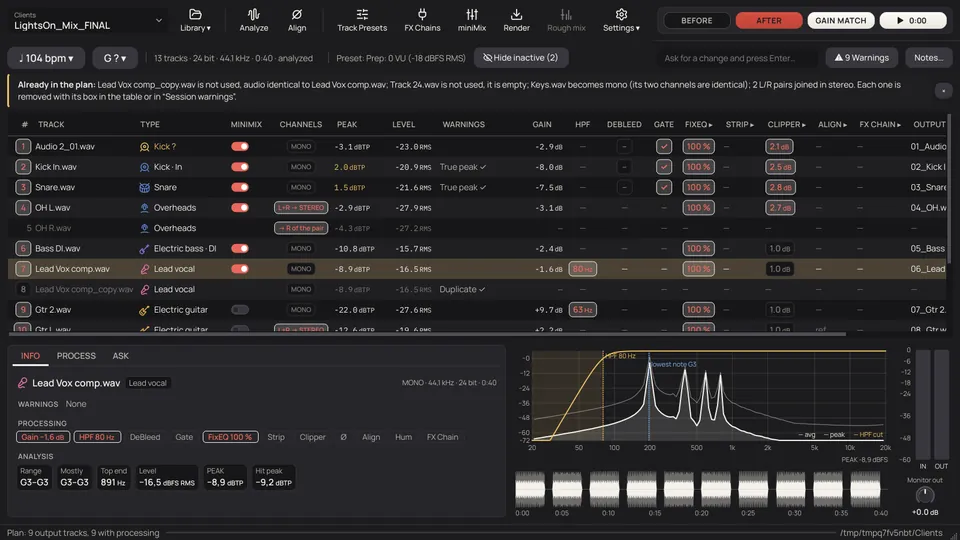
Everything an assistant checks, before the first fader.
Each file is read once and measured. What it finds goes on the track's row, with the reason and the number behind it.
- What each track is
From the name, in six languages, with abbreviations, mic models and typos: Cassa, Rullante, Gesang, Kik, SN, OH, D112. When the name says nothing, the audio helps; when neither is clear, the type comes with a question mark for you to pick.
46 typesin 9 families: drums, bass, guitars, keys, strings, winds, vocals, FX and other. Plus “unclassified”. - Empty tracks and copies, left out
A track active less than 1 % of the time with its peak under −40 dBFS is empty. One loud fill at the end isn't. A file identical to another is a copy. Both come out of the render, each with its own box to put it back.
−40 dBFSthe peak under which a track that is almost never active counts as empty. - A pair, or two takes?
Gtr L and Gtr R can be two mics on one amp or two different takes panned apart. The names don't tell; the audio does. Two mics on one source keep a fixed delay; two takes have one that wanders by milliseconds. A pair is joined in stereo. Two takes stay as two mono tracks.
L+Rjoined in one stereo track. A stereo file whose two sides are identical becomes mono. - Mics of one source
Kick In and Kick Out, Snare Top and Bottom, Bass DI and Amp: the name groups them. A Fet47 and a Ribbon on the same amp: on guitars, bass, keys, strings, winds and vocals the same waveform with a fixed delay groups them too, whatever their names. A group gets one gain and one HPF, and its phase gets checked in Align. On drums the waveform can't tell (every mic hears the whole kit): the name or the AI groups them.
same gainfor every mic of one source, so the balance stays as it was recorded. - Tempo and key, measured
The tempo comes from the click or the drums, over many beats, and is checked half a minute and a minute later: if it holds, the session was cut to a click and the tempo is exact. The key comes from the chords and the bass note. If the music is neither clearly major nor minor, it says so instead of guessing.
104 · 115 · 137bpm, measured in three real sessions whose Readme said the tempo: all three exact. - What the client wrote
The Readme, or the email you paste in Notes: the tempo, the key, what not to use, the markers (Solo 2:10) and the tempo changes, read by rules when each one is on its own line. The take to use, and free writing in any language, need the AI. Markers and tempo changes go into the Reaper project and the DAWproject.
Solo 2:10a line the rules read as a marker, without AI. With AI, any language and any way of writing.
From sixteen loose files to a session.
Ordered in your track order, numbered, named the way your template expects, and levelled. Each row keeps the reason for what was done to it.
- Your track order is set once, in Track Presets, with ↑ and ↓. Every session opens in that order, the miniMix too, and so do the DAW projects.
- The file names you got never change. The output names follow your format, your mix template, or what you write by hand.
Name first, then the audio, then the rest of the session.
What each track is decides almost everything else: its level, its HPF, its gate, its FX Chain and its output name. So it is decided with care, in this order.
By the name.
Six languages, abbreviations, variants (In, Out, Top, Bottom, DI, Amp), doubles (DT, Dbl) and typos. Mic models count too: a D112 or a Beta91 points to a kick, an R121 to a guitar amp.ROOM LEFT - M81 → Room Left · KICK IN SM91 → Kick In
By the audio.
When the name says nothing, or says something the audio contradicts, the spectrum, the attacks and the level decide, or mark the track as doubtful. A tom is Rack or Floor by its fundamental: Floor under 100 Hz."its fundamental is at 87 Hz"
By the other tracks.
The session as a whole helps. Mics of one source are recognised as a group and the two sides of an L/R pair get the same type. The AI, if you use it, sees every name at once: with a Kick In in the session, it reads a track called Sub as a kick too.
With AI, only if you want it.
Only for the doubtful ones: musicians' names, studio names, creative names, any language, looking at the whole session at once. What the AI decides carries an AI mark and its reason.
When it isn't sure, it asks. And it learns.
- A doubtful type comes with a question mark and a warning colour. Double-click it and pick: everything that depends on the type is recalculated.
- Correct it once and it offers to remember the word that explains it. Gonzo = kick: next time it gets it right on its own, also without AI.
- Whatever you set by hand wins over everything else, and stays with the session.
The whole session, in one table.
One row per track and one column for each thing that will be done to it. Left to right: who the track is, what was measured, what it gets at render, and what it will be called.
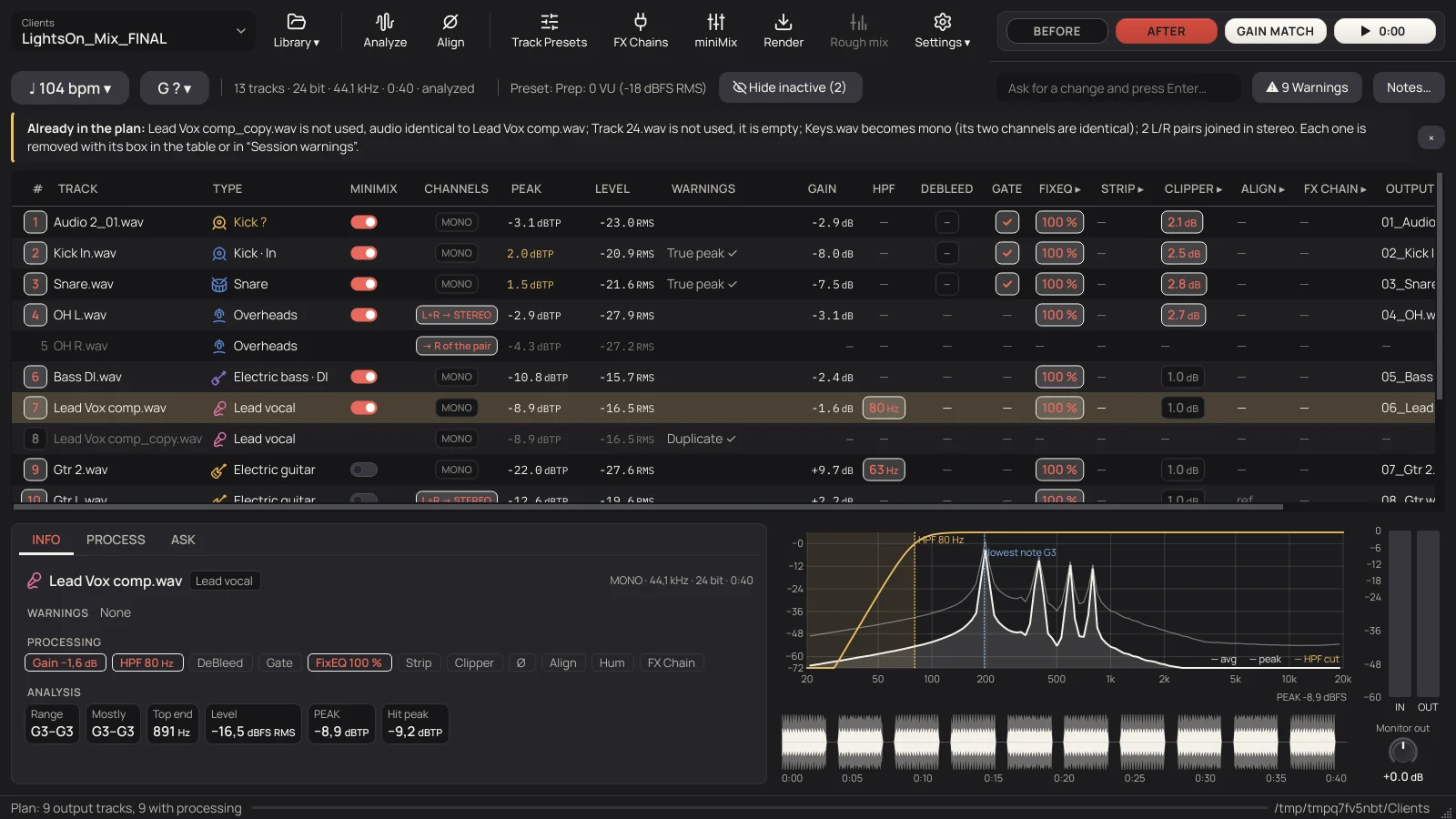
- ♩ 104 bpm
- From the notes or, if they don't say, measured in the tracks. Half, double, or your own. With ≈ when the tempo moves.
- G ?
- The key, measured in the audio, from the notes, or set by you. In letters, as in any DAW: Ebm, F#.
- Already in the plan
- The summary over the table, with names: the copy left out, the empty track, the pairs joined. Close it once and for all with ×.
- #
- The box of each row: lit, the track goes to the render. Copies and empty tracks come unlit, and the tip says why.
- Type
- The instrument's icon and what the track is, with its version: Kick · In, Snare · Bottom. Double-click to change it.
- Warnings
- What it found, in one word: Align, Polarity, OUT Ø, Hum, True peak, Duplicate. Grey when it's only information or the plan already fixes it (with ✓), amber to review.
- Columns with ▸
- The processes that have their own window. Double-click the title to open it on the selected track.
- INFO PROCESS ASK
- Under the table, the selected track: what was measured, its controls, and a question for the AI if you set one up.
- Hover
- The reason for every value is under the mouse: why that cut, why that gain, why it is linked to other mics.
Every warning comes with what to do about it.
What belongs to one track is on its row. What belongs to the whole session (the mains at 50 or 60 Hz, two copies of a track, L/R pairs, mics of one source, what the notes say) is in the Warnings window, with a box for each proposal. A ticked box is applied at render.
| Warning | What it means | Proposal |
|---|---|---|
| Empty | Digital silence, or active under 1 % of the time with the peak under −40 dBFS | Exclude from render |
| Duplicate | Audio identical to another track | Leave the copy out |
| Fake stereo | Both channels identical | Convert to mono |
| OUT Ø | The two channels in opposite polarity | Invert the polarity of the right channel |
| L/R pair | Two mono tracks that are left and right of one thing | Join into one stereo trackTwo doubled takes stay apart. |
| L/R level | One side of a pair sounds lower | Match L/RUnticked: it may be the real stereo image. |
| Same source | Same waveform and a fixed delay, whatever the names (guitars, bass, keys, strings, winds and vocals) | Treat as mics of one sourceTicked when the measurement is clear. |
| Processed version | Vox and Vox Tuned, Bass and Bass Comp | Use only one of the two |
| Hum | Audible mains hum, above −80 dBFS | Remove hum |
| Bleed/Noise | Loud sound in the gaps, above −40 dBFS. Normal in drums and rooms | Gate in the gaps |
| Clipping | Flat-topped peaks (amber from ten on) | Check by ear |
| True peak | Peaks between samples above 0 dBTP | Fixed by the gain |
| DC | DC offset above −60 dBFS | Subtracted |
| Bits | Fewer real bits than the file says: a 24-bit file that is really 16 | Information |
| Sample rates | Tracks at different sample rates | All the same at render |
Ticked by default.

Close it, come back tomorrow, it's as you left it.
Everything you decide is saved on its own, every time you change something. Your library is never touched: the originals stay as they came and everything is written to a new folder.
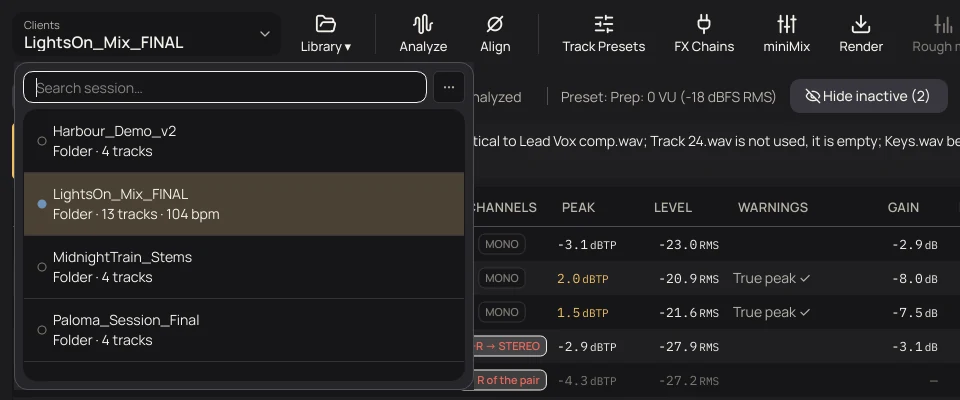
- Alternatives
- Several ways of preparing the same session, each with its name: another gate, other faders, other FX Chains. Each renders to its own folder.
- Start over
- Back to what the program proposes. What you had is saved first as another alternative, so nothing is lost.
- Remove from TapeLeader
- Forgets everything it did with the session, including the unzipped copy. Your library and your renders stay.
- Hide
- Out of the list, out of the search. Nothing is deleted.
- Only your changes
- What it remembers is what you changed, not the whole list: what you didn't touch follows what the program proposes today.
[MANUAL: chapters 3, 4, 6, 7 and 16] The basics, the main window, the analysis, the track types and saved sessions, with every control, are in the manual.