Your plugins, at the level they were built for.
For those who know how a track has to sound before the mix. Your own VST3s go in FX Chains per type of track: a tape on the drums, a console on the bass, a compressor that breathes on the vocal. TapeLeader plays them in real time, measures where each chain starts to colour or clip, and sends every track in at that level, so the same chain works the same on a kick and on a bass.
In the app: the FX Chains window, the FX Chain card in PROCESS, the miniMix and Track Presets, and Settings ▾ → Installed plugins…
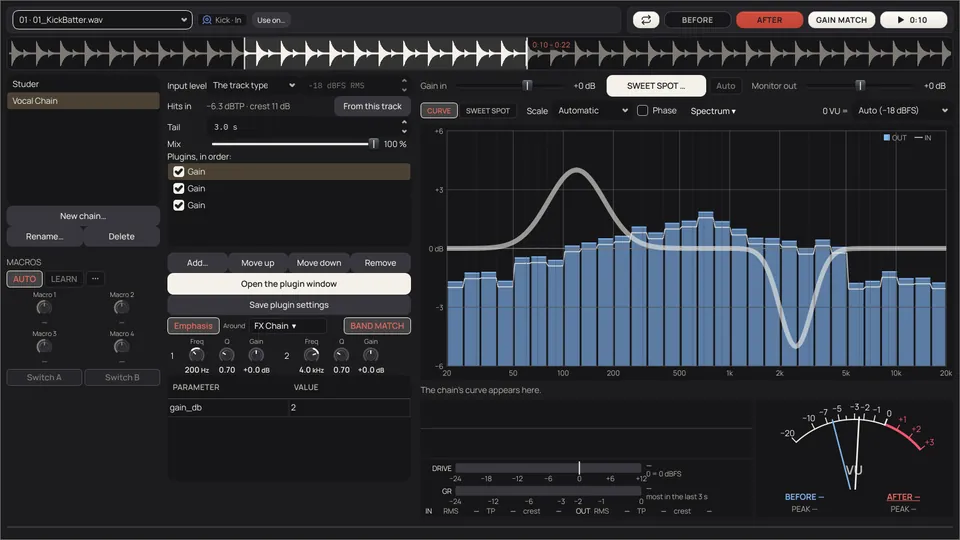
The colour you chose, on every track that needs it.
TapeLeader's own processes clean and prepare: its Clipper only shaves peaks, FixEQ only corrects tone. Colour, tape, saturation and compression are the engineer's call and the engineer's plugins.
- FX Chains per type of track
Up to four of your VST3 plugins in order, set for a type of track in Track Presets, or for one track. Kick In and Kick Out can have their own.
4plugins at most per FX Chain. - Heard while you turn the knobs
The chain plays in real time, with latency compensated, so BEFORE and AFTER are the same instant of the music. Open the windows of several plugins at once and close them in any order.
A = Bin time: in and out of the chain always line up. - At its sweet spot
SWEET SPOT measures what the chain does at every input level and sets the Gain in where the chain colours as much as you asked, without touching the plugins' own knobs.
1 %distortion of the body by default for a colour (0.1 to 10 %, per FX Chain): about what the 0 VU light of a Fatso marks. - Hits that land the same
By the hits: on drums and percussion, the typical hit of each track reaches the chain at the level the chain was set with, so one chain set on one snare works on every snare. The rest go in at the level of their type.
1 chainset on one snare, ready for every snare: two with the same RMS can have their hits several dB apart. - Oversampling per plugin
×2 or ×4 on the plugin that saturates, not on the whole chain. What you hear is what renders.
30 dB+lower, the strongest alias tone of a simple saturator with ×4, in the app's own test with two tones at 5 and 6 kHz.
The chain, its curve and its meters.
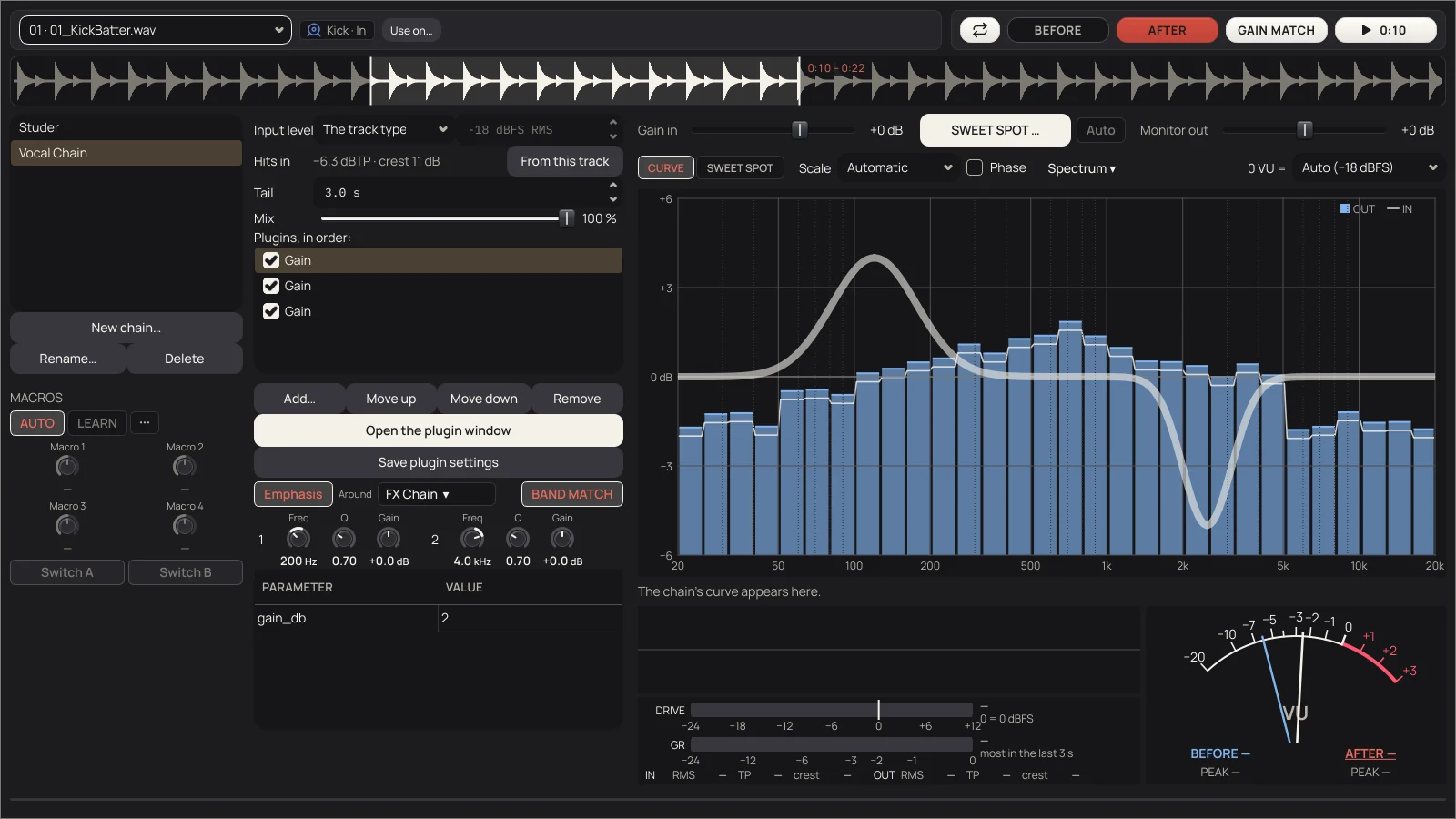
BEFORE is the track already prepared, as it reaches the chain. AFTER is after every plugin that's on. GAIN MATCH keeps adjusting AFTER to the level of BEFORE while it plays, so you hear the colour and not the volume.
- CURVE
- What the chain does to each frequency, measured with pink noise at its input level, as an analyser with its generator would. Not a sweep: with a compressor, a sweep lies.
- Spectrum
- The output in bars, the input as a thin line through them: where the line is above a bar the chain takes, inside it the chain adds.
- Gain in
- How hard the track goes into the chain. It is saved with the chain and the render goes in the same way.
- DRIVE · GR
- DRIVE: the peaks going in, against where the chain starts to clip or compress. GR: what the chain takes, measured against the chain clean, so EQ doesn't count.
- VU
- Two needles, BEFORE and AFTER, with real VU ballistics. 0 VU is where the chain works at its sweet spot.
- Use on…
- The chain you're hearing, for this track, for its whole type, or as a copy only for this track.
- Bypass · OS
- On a small bar on top of each plugin's own window, the same as the box and the right click in the list.
- Mix
- How much of the whole chain you hear, with the dry signal delayed by what the chain really takes and matched in level. What the plugins themselves turn in phase can't be lined up: the window warns where the blend loses more than 1.5 dB.
What the chain does, at every level.
An EQ curve can't show a clip or a compression. SWEET SPOT can. It doesn't look at names: it sends through your chain, as you set it, tones from −60 to +6 dBFS, a loud tone followed by a soft one, and the stretch of the track you chose, and looks at how it answers. A few seconds.
- What the chain is, in one line: linear, colour without clipping, colour with clipping, clipper, or compressor, limiter or tape.
- Four figures against the same chain 30 dB lower: Hits, Loudness, Distortion (or Body) and Tone.
- What it proposes: for a colour, 1 % distortion of the body, and the hits 1 dB under where it starts to clip. For a compressor or tape that presses, the hits 1 dB down. For a clipper, the hits 1 dB over where it clips. Never the hits above −1 dBTP.
- Warnings: memory (it takes time to come back after a loud hit), aliasing, a chain much louder clean, peaks that grow.
- The SWEET SPOT button next to Gain in says how far it would move it (+3 dB, say) and takes it there, for every track that uses the chain. With Auto, every time it measures.
Drawing of a saturating (colour) chain. In the app, the curves are measured on your chain and your track.
Push one band into the tape.
Emphasis: up before, exactly down after.
- One or two bands TapeLeader raises before the chain and lowers exactly after it. That band hits what saturates harder and saturates sooner: the crack of a snare around 4–5 kHz, the body at 200 Hz. With negative Gain, the opposite: the band is protected while the rest saturates.
- The pre-emphasis of tape and vinyl. It works with any saturator, with or without EQ, because the cut is always the exact mirror of the boost: if nothing saturates, the track comes out the same.
- Around the whole chain or one plugin. BAND MATCH gives back what the band loses on average when it saturates, so only its loud hits get pressed.
- Freq, Q and Gain per band, at 0 dB by default: TapeLeader doesn't propose tone. The Gain can be set per type or per track.
Macros: four knobs and two switches. In progress.
- Built and parked while they mature: they're in the app, but not finished. Each one moves any controls you want in the chain's plugins at once, each with its own range, like the macros of Blue Cat's PatchWork. A macro can move the Gain in or the chain's Mix; a switch can bypass a plugin.
- AUTO proposes Drive, Mix, Tone and Output by reading the names of each plugin's controls, without changing what you hear. LEARN: touch a macro and move a control in a plugin's window.
- Set per type in Track Presets or per track in PROCESS and the miniMix: the track wins, then the type, then the chain. At render each track goes through the chain with its own values.
A plugin that crashes doesn't take the app with it.
Plugins run in their own process, as Bitwig runs them. TapeLeader keeps going, says which FX Chain and track it was, and leaves that track unprocessed.
Scan once.
Each plugin is tested in a separate process: maker, category, the latency it declares and the real one, and whether it works. Instruments are skipped. Stop at any time and it carries on next time where it was.
One plays, one measures.
Each plugin of the chain is loaded twice: one sounds, the other gets the same settings and measures the curve in silence, so the test signal is never heard and never disturbs what's playing.
Saved where any VST3 host can read it.
The settings of every plugin are saved as .vstpreset in the chain's folder, with its controls next to it, so plugins that only apply a preset when their window opens still sound right.
Printed, or live in the DAW.
At render the chain is printed, through the same path you heard. Or, in the DAWproject, the plugins open live in Bitwig and Studio One with their settings (in Cubase, check it in your version). A chain with Emphasis or a Mix under 100 % is always printed: that part is TapeLeader's.
[MANUAL: chapter 12] FX Chains and plugins, with every control, are in the manual.