Everything before the mix.

A client sends 64 files and half of them are called Audio 1_03, Audio 1_04… TapeLeader checks, names, aligns, cleans and levels every track, tells you why, and hands you a project for your DAW. You start with the music.

For Windows. macOS is plannedAny DAW: WAV, Reaper, DAWprojectWorks without AIYour originals are never touched

The session you got, sorted before you open your DAW.

A BD in and a BD out, two mics on one kick. A comped vocal and an exact copy of it. An Audio 1_03 nobody named, and a Track 24 that never makes a sound. TapeLeader reads the folder or the ZIP as it came and goes through every file the way an assistant would.

  • Knows what each track is from its name: 46 track types, in English, Spanish, Italian, German, French and Portuguese, with abbreviations, mic models and typos.
  • Groups the mics of one source. On amps, basses, keys and vocals it also finds them by their waveform, even when the names don't match.
  • Leaves out silent tracks and exact copies, joins L/R pairs, and turns fake stereo into mono.
  • Orders, numbers, names and colours everything the way your mix template expects, or keeps the client's names with your numbers in front.
  • When it isn't sure, it says so: its guess is marked for you to confirm.
Film 1
From a ZIP to a sessionAbout 45 seconds in the real app. To be shot.
~/Clients/SONG_FINAL_v7.zip16 files
Drawing of an example session. The app writes these reasons in its report.

Every decision comes with the number behind it.

TapeLeader measures each track before it touches it, and only proposes what the measurement can justify. Each proposal says what it found. If the measurement isn't reliable, it proposes nothing.

  • Hear it before you keep it. BEFORE and AFTER for every process, with GAIN MATCH where the loudness changes, so you judge the process and not the volume.
  • Undo anything. Each process is a button in its column. Turn it off and the track goes out without it.
  • Your call wins. Whatever you set by hand stays. Correct a track type once and it offers to remember the word for next time.
Film 2
Align, and the reason whyAbout 60 seconds: kick and snare mics, checked by ear. To be shot.

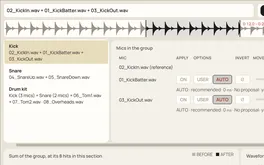
AFTER · the snare mics in polarity, bottom moved 0.32 ms

Raises BEFORE to the loudness of AFTER

Drawing: the sum by bands, measured on the hits, and two hits, BEFORE and AFTER. The figures are from one real session; the Align window, on its 8-second stretch, shows 5.3 dB at 125 Hz.

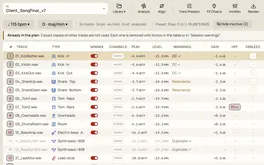
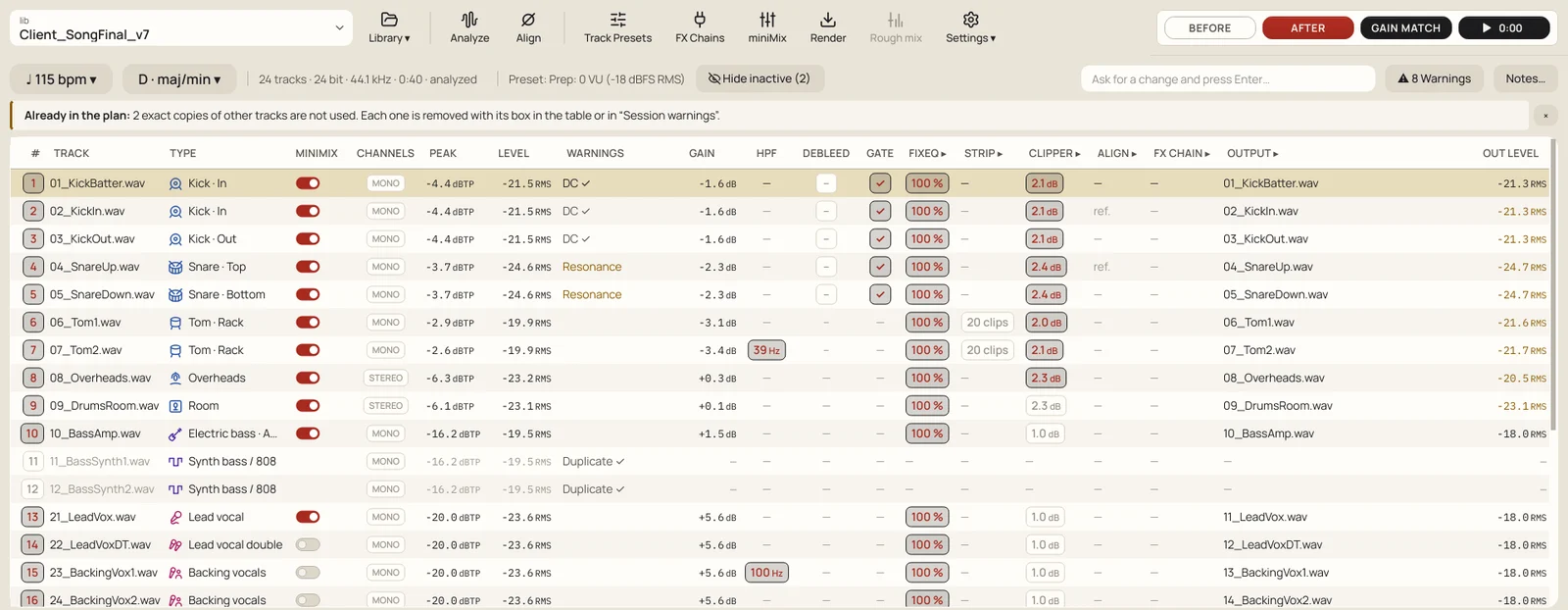
TapeLeader's main window: one row per track with its type, level, warnings and a column per process (gain, HPF, DeBleed, gate, FixEQ, Strip, Clipper, Align, FX Chain, output name)
The real main window, in the app's TapeLeader theme, light or dark like your screen: one row per track, one column per process. Hover any value for the reason.The app, with an example session

Lined up and labelled, before the first fader.

On tape, the reference tones came right after the leader, so every machine played back at the same level. TapeLeader does that for your plugins: each track is brought towards a working level, by default 0 VU = −18 dBFS RMS measured only where the track plays, without passing a −6 dBTP ceiling: on drums and other spiky tracks, the ceiling decides first. Mics of one source get the same gain, so their balance stays as recorded.

The session as it arrivedDrawing: the tape-era line-up. In the app, the gain of each track is in its GAIN column, and the ceiling can stop it short of 0 VU.

Level presets in the app Prep: 0 VU (-18 dBFS RMS) default Prep: with headroom (-20 dBFS RMS) Prep: by peaks Prep: hybrid Balance: pop/rock Balance: hip hop/electronic Balance: acoustic/jazz Balance: averages of real mixes Balance: flat No level changes

The miniMix: eleven channels with faders, process buttons and channel names written on masking tape, a master with loudness readings, and the song with the section that loopsFilm 3 · to be shot
Line-up and the miniMix. About 45 seconds: the levels, then a few tracks on a loop. Until it's shot, the real miniMix as it is today.The app, with an example session

What it fixes, by the problem you'd have.

The jobs you'd do before the first fader moves, measured on each track instead of set from a table. Each one with a number from a real session.

  • Mics that fight each other

    Kick, snare and overhead mics arrive in time and in polarity with each other, so the kit sums full instead of hollow. You still decide by ear.

    How it does it

    Align measures delay and polarity between mics of one source on the hits, and moves the overheads once towards the drum they carry best, usually the snare. It offers options; you compare them with BEFORE and AFTER and keep the one you like.

    0.08 msbetween one of its options for a kick out mic, 3.36 ms, and what Iván had set by ear, 3.44.
  • What leaks in

    Switch DeBleed on and the other drums come down in each close mic, inside the hit too.

    How it does it

    DeBleed learns how each drum sounds in this session and takes the others out of each close mic. The gate listens to the other drum through its side-chain (SC), and no level gate goes where there are ghost notes.

    4–12 dBhow far the gate brings the other drum down, set track by track from how much leaks in.
  • Noise nobody asked for

    Hum and rumble go without thinning the notes, and long silences are cleaned up but stay editable.

    How it does it

    Hum is measured and subtracted, not notched, so notes on the same frequencies stay. The HPF goes just under the lowest note each track plays (1 dB down there by default; option B cuts right at it); on kick and toms, under the lowest they can be heard; on the snare, under where its own hits start. Strip Silence turns long silences into clips you can still stretch.

    −18 → −50 dBthe hum on one guitar, before and after.
  • Files that lie

    You hear about the broken files before you start mixing, not halfway through.

    How it does it

    It checks for silent tracks, exact copies, fake stereo, L and R in opposite polarity, mixed sample rates, and clipping, with the time of the first one.

    24 / 16a 24-bit file that only carries 16 bits of audio, spotted and reported.
  • Your names, your order

    The session opens laid out like your template, every track where your hands expect it.

    How it does it

    Every track is numbered and named in your template's order, with your own name format and colours by family.

    46track types it knows, with versions like Kick In, Snare Bottom or Tom Floor.
  • Plugins at their sweet spot

    Your plugin chains get the level they work best at on every track, so they colour the way you expect.

    How it does it

    Your VST3s go in FX Chains per track type. SWEET SPOT measures where a chain starts to colour or clip and sets the gain there, so drum hits reach the chain at the same level whatever the drum.

    1 dBon a chain that colours and then clips, where hits land by default: just under the clip.

Opens in any DAW. Originals untouched.

Everything is written to a new folder. The WAVs share length and start, carry BWF and iXML metadata, and are named and numbered in your order.

  • A Reaper project and a DAWproject for Studio One, Bitwig and Cubase 14 or later: folders by family, colours, tempo, the client's markers, the gate as automation and Strip Silence as clips. Cubase doesn't import automation or tempo from a DAWproject yet: for Cubase, print the gate into the audio.
  • Pro Tools or Logic: drag the WAVs in. They line up and land in your template's order.
SONG_FINAL_v7/
├── Audio/13 tracks
│ ├── 01 Kick In.wav
│ ├── 02 Kick Out.wav
│ └── 03 Snare Top.wav …
├── Reference/the client's mix, muted
├── SONG_FINAL_v7.rppReaper
├── SONG_FINAL_v7.dawprojectStudio One, Bitwig, Cubase 14+
└── Report/report.htmlwhat it did, and why

Works without AI. With AI, it also reads what's written.

Every level, filter, gate, delay and polarity comes from measuring the audio, with plain signal processing you can check. AI is an option for what's written for people: odd track names, the client's email, your habits.

It never receives audio and never sets a level, filter, gate or delay. With AI off there's no account, no connection and no model to install, and what a name doesn't say is marked for you to pick. Run a local model with Ollama and nothing leaves your computer.

Drawing of an example session

Removals the AI proposes come unticked: the last word is yours.

Why it's called TapeLeader.

A tape leader is the strip of plastic or paper spliced to the start and end of every reel. It records nothing. It threads the machine without touching the music, protects the first and last inch, and separates the songs with clean, visible silence. Right behind it came the reference tones, 1 kHz at 0 VU, to line up the machine that would play it back.

An assistant did all that before the mix engineer walked in, and wrote every channel on the masking tape along the desk. TapeLeader does that work today, on the session you just received, so you start with the music.

1 kHz · 0 VU SONG 1 · take 3 Leader: threads the machineand records nothing Timing marks Masking tape:what's on the reel Splice Reference tonesline up the machine The music
  1. Leader with timing marksthreads the machine and records nothing
  2. Masking tapewhat's on the reel
  3. Splicejoins the leader to the tape
  4. Reference tones, 1 kHz at 0 VUline up the machine
  5. The musicwhat the reel is for
Iván[PHOTO: to come]

Made by a mix engineer.

Iván Candela mixes records. He prepared every session by hand, track by track, before the first fader moved, and built TapeLeader to do that part. [BIO: two or three lines in Iván's words]

[CREDITS: artists, records, studios]

Be first to try it on a real session.

TapeLeader runs on Windows 10 and 11. Leave your email and the DAW you mix in, and I'll write when there's a build to try.

Iván

One email when there's a build, and nothing else.

[Privacy] [FORM SERVICE]