Works without AI. With AI, it also reads what's written.
No account, no connection, no model to install: TapeLeader works completely without AI. Everything measured in the audio, levels, filters, gate, phase, hum, key, is plain signal processing you can check. AI is an expert mode for what's written in human language, where rules fall short: odd track names, the client's notes, the way each studio works.
In the app: Settings ▾ → AI, the ASK tab, the Ask for a change box and Notes…
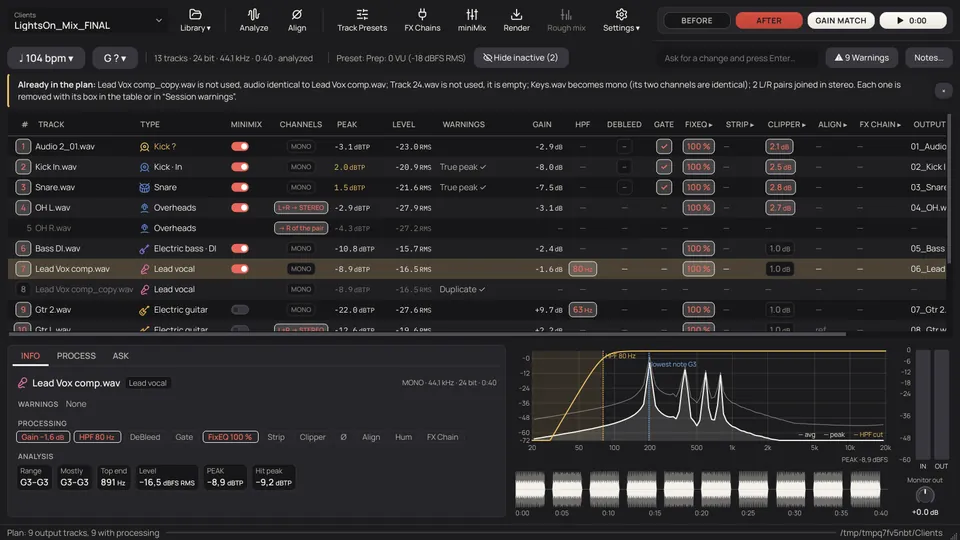
Off, it asks you. On, it reads the notes.
With AI off, what a name doesn't say is marked for you to pick. With AI on, it reads the whole session at once and the client's email, and settles what it can.
- It never receives audio: only names, measurements and the texts of the notes. Run a local model with Ollama and nothing leaves your computer.
- It never sets a level, a cut, a threshold or a delay: those come from the audio. The only figures it passes on are the ones written in the notes or in your order: a tempo, a marker.
- What the AI or the notes propose to remove always comes unticked. What you set by hand always wins.
Without AI, and with it.
| Area | Without AI | With AI |
|---|---|---|
| Track types | A dictionary in six languages, mic models and the audio; doubtful ones come with a ? | Musicians' names (Dave 1–4), room names, creative names, any language, looking at the whole session at once |
| Pairs and mics of one source | Coherence and delay, measured | Decides the cases in no-man's-land with the names and the figures |
| Client's notes | Tempo, key, metre, exclusions, the good take, markers and tempo changes, by patterns | Any language and any way of writing |
| Reviewing the session | Versions like Vox and Vox Tuned, found by name | Which one to use from the notes; tracks that are the whole mix or only bleed; doubtful phase |
| Preset | You choose | Proposes one by the style of the session |
| Mix template | Matched by type, variant and words | Matched by meaning where it's doubtful |
| Names | The format you write | Works out your format from two or three examples |
| Learning | The words you confirm are remembered | Picks the word that explains your correction; what it learns then works without AI |
| Texts for the client | A summary and an email with the facts | Better written, in English or Spanish |
| Questions and orders | — | "Why…?" on a track; orders in plain words for the type, the HPF, gate, hum, mono, exclude, an FX Chain or the tempo, shown to you to tick first |
Ask in your own words.
- In the box next to the session's title: "take the gate off the toms", "the room in mono", "tempo 92". The AI can only turn it into actions of the app, and shows you the list to tick before anything is applied.
- In the ASK tab of a track: "why this cut?". It answers with that track's plan and measurements. It doesn't listen to the audio. (For now it answers in Spanish.)
- Texts for the client: a summary of what arrived and what was done, and an email asking for what's missing: files that didn't come (when the Readme says how many), clipping with the minute, mixed sample rates, no reference mix or tempo.
Rules first. Closed answers. Always visible.
Rules first.
The AI only acts where the rules doubt, or when you call it.
Closed answers.
It always answers in a strict format, and its values can only come from the app's own lists: the types, your tracks, your presets, your installed plugins, the possible actions. Anything else is thrown away. It can always say "I don't know", and that's better than guessing.
Checked.
If an answer isn't valid it tries once more; if it fails again, the rules stay. Asking the same twice gives the same answer and costs nothing.
Visible.
What the AI decides carries an AI mark and its reason (for now, the reasons come in Spanish). If the AI doesn't answer, it says "AI not available" at the bottom and everything goes on without it.
On your computer, or in the cloud. Your choice.
Untick "Allow cloud models" and only local models are used.
| Provider | Where it runs | What it needs |
|---|---|---|
| Ollama | On your computer | Ollama and a model. TapeLeader starts it if it isn't running. A model whose name ends in -cloud runs on Ollama's servers, not yours |
| OpenAI-compatible | Local (LM Studio) or in the cloud (OpenRouter, Mistral…) | The server's address; a key if it's in the cloud |
| OpenAI | Cloud | API key |
| Anthropic (Claude) | Cloud | API key |
| Google (Gemini) | Cloud | API key |
[MANUAL: chapter 11] The AI, what it does one by one and its settings, are in the manual.