Every track at a working level, under a peak ceiling.
On tape, the reference tones came right after the leader, so every machine played back at the same level. TapeLeader does that for your plugins: each track is brought towards a working level, by default 0 VU = −18 dBFS RMS measured only where it plays, without passing a true peak ceiling. On sustained tracks the target decides; on drums, the ceiling usually stops them first. And on drums, its Clipper shaves the crest of each hit, a couple of milliseconds that set the peak but you barely hear, and gives the body back at the same peak.
In the app: the Level card in Track Presets, the Gain, Level and Out level columns, and the CLIPPER card and window.
Plugins that work where they were designed to.
Many analogue emulations expect 0 VU around −18 dBFS; some −12 or −20. A track that comes in at −6 drives it into something you didn't ask for; one at −35 barely touches it. Lined up, sustained tracks start near the same place, and drums stop at their peak ceiling (see Out level, below). Levels by instrument, closer to where an engineer would set each one, are on the way.
- 0 VU for your plugins
Each track is brought to the target of its type, measured only where it plays, so the silences between phrases or hits don't fool the reading. The same gain on the whole track: its dynamics don't change.
−18 dBFSactive RMS, the default target: the average where the track plays. On a VU the loud parts read a couple of dB above 0. - A peak ceiling
The true peak ceiling is checked twice: when the gain is worked out, with the original file, and again at render, after the filters, because an HPF can raise a peak by a few dB. If it would pass, the track comes down just enough, and so do the other mics of its source.
−6 dBTPthe default ceiling, measured between samples with 4× oversampling. - Mics of one source, one gain
Kick in and out, snare top and bottom, bass DI and amp, the overheads: they all get the same gain, so the balance between them stays as it was recorded. A joined L/R pair too.
1 gainfor every mic of one source. Give two versions their own targets and each goes to its own. - Same peak, more body
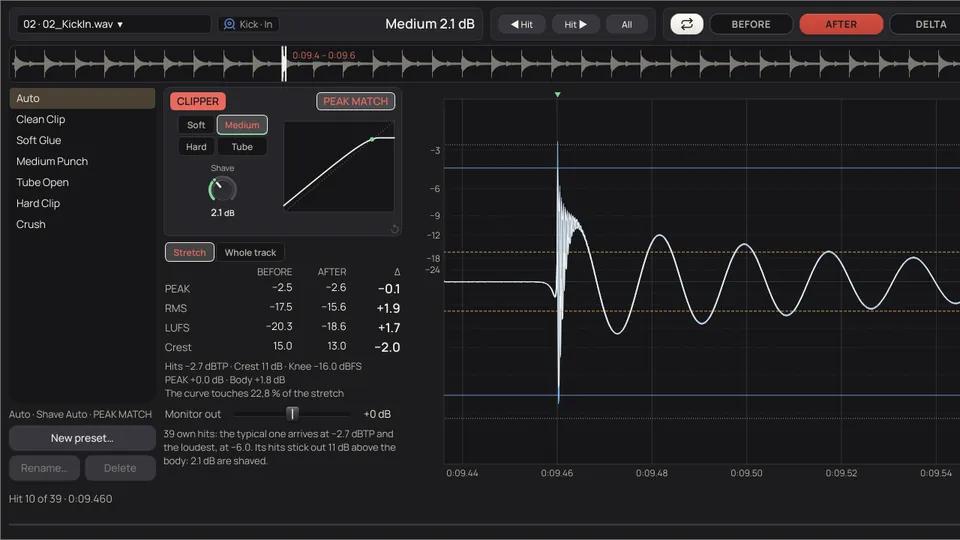
Clipper rounds only the crest of each hit, then raises the track by what it shaved. The hit goes back to its peak and the body that follows it, which is what you hear as level, comes up.
+2.6 LUthe most it gained on the kick, snare and toms of a real session (the least, +1.5), with the true peak within 0.1 dB of where it was, or up to 1 dB lower.
Lined up, labelled, at 0 VU.
Five channels arrive with their own names and their own levels. As the 1 kHz reference passes, each needle lines up, the gain is written under it, and the channel gets its name on masking tape.
A target per type of track, and a ceiling.
The level is set in Track Presets, for each of the 46 types and their versions, and works the same in every session you open.
Measure the way the type asks.
RMS of the active part, LUFS or peak, or no level change at all. The level is measured on what will come out: a joined L/R pair or a track turned to mono, as it will be.-21.8 RMS · -24.6 LUFS · -1.6 TP
Go to the target, under the ceiling.
The track goes to its target unless that would take its true peak over the ceiling; then the ceiling wins. It never raises a track by more than 24 dB.
One gain for each source.
Mics of one source get the same gain, so the balance between them stays as recorded. Versions of a type (Kick · In and Out) share it while they have the same target.
With an FX Chain, two levels.
A compressor brings the level down, a tape or a saturation brings it up, and each chain expects its own input: −18, −12, or by the peak of the hits. So the track goes into the chain at the level the chain asks for (by RMS, under the ceiling of its type; by the peak of the hits, exactly), comes out, is measured again over the whole track, and is left at the final level of its type.Input level → FX Chain → Final level

When a track can't reach its target, it says so.
- The Out level column estimates the level each track will have in its WAV, in the same measure as its target; the render measures the real one. With an FX Chain it shows the final target. Half a dB or more under the target and it turns amber, and the mouse says why.
- Nearly always it is the ceiling, because a kick or a snare has its hits far above its body, or the shared gain of the mics of its source.
- To get there: raise the ceiling of that type in Track Presets, or let Clipper shave a little more.
Prep, or a rough balance to start from.
Ten presets come with the app, from published gain-staging guides, mixing cheat sheets and one academic study of real mixes. The Prep ones leave every track at a comfortable working level. The Balance ones go further and leave a rough balance when you open the project. Save your own, with every type set your way.
| Preset | What it does |
|---|---|
| Prep: 0 VU (-18 dBFS RMS) | Every track at −18 dBFS active RMS, about 0 VU, with a −6 dBTP ceiling. The usual before analogue emulations. The default. |
| Prep: with headroom (-20 dBFS RMS) | The same, with 2 dB more headroom. |
| Prep: by peaks | Drum hits at −8 dBFS peak, the rest at −10, overheads, rooms and cymbals at −14. |
| Prep: hybrid | Drums by peaks (−10 dBFS; ambience −14) and the rest at −18 dBFS RMS. |
| Balance: pop/rock | Lead vocal at −23 LUFS; against it, kick −3 dB, snare −2, bass −4, guitars −1, backing vocals −6, overheads −8. |
| Balance: hip hop/electronic | Kick +1 dB and bass or 808 −2 against the vocal; synths and pads −7. |
| Balance: acoustic/jazz | Drums lower (kick −5, snare −6), bass −7; guitars and piano nearly level with the vocal. |
| Balance: averages of real mixes | From a study of 64 mixes (8 songs, each mixed by 8 sound-recording students at McGill; De Man et al., 2014): against the vocal, bass −7, kick −10.5, snare −14, toms and cymbals −12, overheads −11. |
| Balance: flat | Everything at the same loudness, −23 LUFS: a neutral start, close in spirit to the pink noise method. |
| No level changes | No gain is applied (a track only comes down if a peak would pass 0 dBTP). Filters, gate and FX Chains still apply, and Clipper still raises the body of drum hits unless you turn it off. |
It shaves the crest. The tone stays.
The crest of a kick or snare hit lasts 1 to 3 ms. It sets the peak of the track, but you hardly hear it as level: what you hear is the body behind it. Clipper rounds only that crest, sample by sample, with no attack and no release, so the body doesn't notice, nothing pumps and the phase doesn't move. Then PEAK MATCH raises the track by what was shaved.
- It is a peak shaver, not a saturator: it only touches the crests of the hits, a couple of milliseconds, too short to change the tone of the track. For the sound of a particular box, your plugins in an FX Chain.
- On by default on kick, snare, toms, overheads and percussion, when the track has enough hits, alike and with a crest to shave. Elsewhere it comes off and you can turn it on.
- Mics of one source go together and come up by the same amount.
- 4× oversampling up to 48 kHz and 2× up to 96 kHz (above that it isn't needed), with linear-phase filters: the track doesn't move in time.
AFTER · Medium, Shave 2.0 dB, PEAK MATCH
Drawing of one kick hit, 40 ms, with an approximate curve. In the app the figures come from each track's own hits.
| Character | How it rounds | How it sounds | Default character of |
|---|---|---|---|
| Soft | Soft knee: starts low and presses a little of the body too | Denser, more glued | Snare, percussion |
| Medium | Clean below, only the 3rd harmonic up to the top | A firm hit | Kick, congas, bass |
| Hard | Hard knee: nothing below the hit is touched | The most transparent, and the one that gains most level | Hi-hat, cymbals, overheads |
| Tube | Asymmetric: one half of the wave is pressed harder, even harmonics | More open; the one that gains least | Toms, vocals |
Down to each sample, BEFORE and AFTER.
In the Clipper window the only thing that changes between BEFORE and AFTER is Clipper. Everything that comes before it is already done; the FX Chain comes after and isn't heard here.
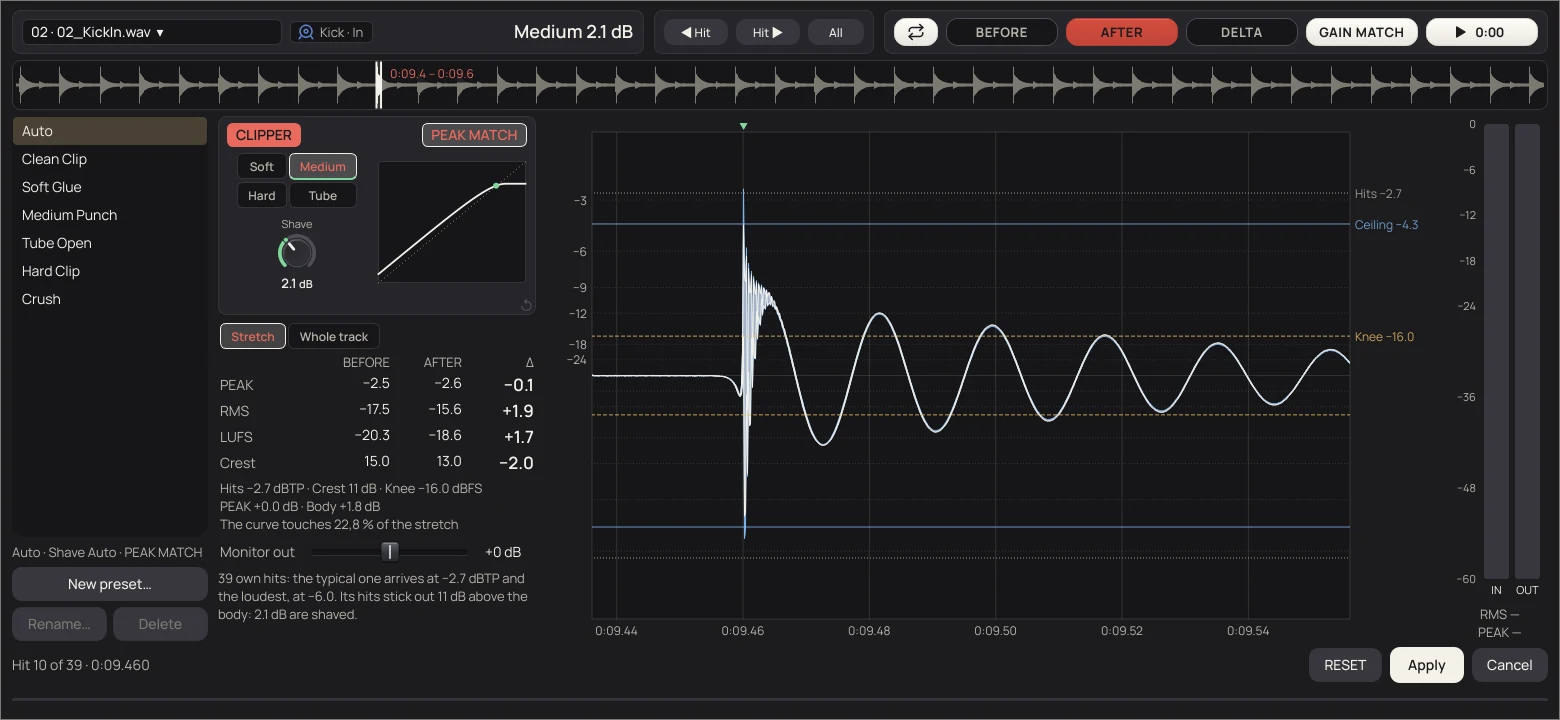
- BEFORE AFTER
- The track with everything before Clipper done (Align, DeBleed, HPF, hum, gate, FixEQ, Strip Silence, its gain), without and with Clipper.
- DELTA
- Only what the curve changes: the crests it takes off and the harmonics it adds. What it doesn't touch is silent.
- GAIN MATCH
- Brings AFTER down to the loudness of BEFORE, so you hear what it does to the sound and not the level it gains.
- Shave
- The dB taken off the crest of the track's typical hit, 0.5 to 9. Softer hits are shaved less, accents more.
- PEAK MATCH
- On: after shaving, the track comes up by what was shaved. Off: the body stays and the peak comes down.
- Hits · Knee · Ceiling
- The lines on the wave: the level of the loud hits, where the curve starts to round, and the top.
- ◀ Hit · Hit ▶
- Jump to the previous or next loud hit, 120 ms on screen. The wheel zooms down to each sample.
- IN · OUT
- BEFORE and AFTER at the same time: the light bar is the peak, the solid one the RMS. With PEAK MATCH the light bars match and OUT's solid bar is higher.
- Presets
- Auto, Clean Clip, Soft Glue, Medium Punch, Tube Open, Hard Clip and Crush. Save your own.
[MANUAL: chapters 8, 9.6 and 9.10] Track Presets, the gain and Clipper, with every control, are in the manual.